
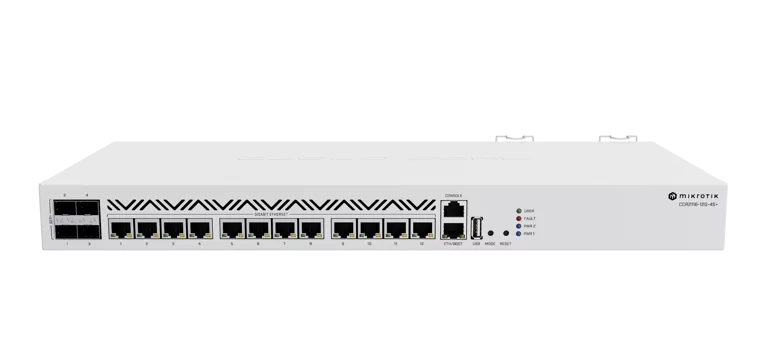
Classe enterprise para ISPs medios e grandes. O CCR2116-12G-4S+ entrega 51 Gbps com L3 Hardware Offloading, BGP 6x mais rapido que antecessores e fonte redundante. Projetado para ser o core router da sua rede.
O Que Vem na Caixa
- 1x CCR2116-12G-4S+ (unidade rackmount 1U)
- 2x Cabos de energia IEC (fontes AC redundantes)
- 1x Suporte para rack (rackmount bracket)
- 1x Kit K-57 (parafusos e acessorios)
Especificacoes Tecnicas
| Especificacao | CCR2116-12G-4S+ |
|---|---|
| CPU | AL73400 (Amazon Annapurna Labs Alpine), ARM 64-bit, 16 cores, 2000 MHz |
| RAM | 16 GB DDR4 |
| Storage | 128 MB NAND |
| Switch Chip | Marvell 98DX3255 (Aldrin) |
| Portas Ethernet | 13x Gigabit: 12 via switch chip (3 grupos de 4) + 1 direta ao CPU (gerencia) |
| SFP+ | 4x SFP+ 10G (cada uma full-duplex direto ao switch chip) |
| USB | Nenhum (modelo padrao) |
| M.2 | 1x PCIe Gen 3.0 x4 (NVMe 2280) |
| Serial Console | RJ45 |
| Alimentacao | 2x AC 100-240V (dual redundante com failover automatico) |
| Consumo maximo | 83W (60W tipico) |
| Form Factor | Rackmount 1U, 443 x 199 x 44 mm, 4 ventiladores, peso 3.2 kg |
| Temperatura | -20 C a +60 C |
| RouterOS | Licenca Level 6 (somente v7) |
| Recursos Especiais | L3 Hardware Offloading (51 Gbps), M.2 NVMe, BGP 6x mais rapido, fonte dual |
Alimentacao e Redundancia
| Entrada | Tensao | Observacao |
|---|---|---|
| Fonte AC 1 (Principal) | 100-240V AC | Conector IEC padrao, hot-swap |
| Fonte AC 2 (Redundante) | 100-240V AC | Failover automatico em caso de falha |
| Consumo Tipico | 60W | Em operacao normal |
| Consumo Maximo | 83W | Carga total com 4 SFP+ ativas |
Redundancia de energia real. As duas fontes AC operam simultaneamente. Se uma fonte falhar, a segunda assume instantaneamente sem queda de servico. Para ambientes criticos de ISP, isso elimina a necessidade de fontes externas redundantes.
Diagrama de Bloco
Benchmarks Ethernet
Fonte: MikroTik (testes em laboratorio com RouterOS v7). Valores em Mbps.
Metodologia: testes bidirecionais com multiplos fluxos, hardware em temperatura ambiente controlada (25 C). Pacotes de tamanho fixo conforme coluna.
| Modo | Configuracao | 1518B (Mbps) | 512B (Mbps) | 64B (Mbps) |
|---|---|---|---|---|
| Bridging | none (fast path) | 38.919,1 | 37.333,4 | 16.025,6 |
| Bridging | 25 bridge filter rules | 32.333,4 | 10.986,3 | 1.500,8 |
| Routing | none (fast path) | 39.009,0 | 37.377,2 | 15.284,0 |
| Routing | 25 simple queues | 39.009,0 | 25.897,4 | 3.427,7 |
| Routing | 25 ip filter rules | 39.009,0 | 16.088,7 | 2.122,4 |
| Routing | none (L3HW Offloading) | 51.323,7 | 50.045,1 | 40.181,8 |
Visualizacao comparativa - Routing 1518B (Mbps):
Fast Path (1518B)
39.009 Mbps
25 Simple Queues (1518B)
39.009 Mbps
25 IP Filter Rules (1518B)
39.009 Mbps
L3 Hardware Offloading (1518B)
51.323 Mbps
L3 Hardware Offloading: o diferencial. O chip Marvell Aldrin faz roteamento L3 inteiramente em hardware, atingindo 51,3 Gbps com pacotes de 1518 bytes e impressionantes 40,1 Gbps mesmo com pacotes minimos de 64 bytes. Isso libera os 16 cores do CPU para processamento de regras de firewall, queues e BGP.
Benchmarks IPsec
Fonte: MikroTik (testes em laboratorio com RouterOS v7). Valores em Mbps.
Metodologia: tuneis IPsec site-to-site com criptografia simetrica, temperatura controlada (25 C).
| Configuracao | Criptografia | 1400B (Mbps) | 512B (Mbps) | 64B (Mbps) |
|---|---|---|---|---|
| 1 tunel | AES-128-CBC + SHA1 | 2.012,6 | 763,5 | 93,6 |
| 256 tuneis | AES-128-CBC + SHA1 | 4.108,2 | 2.733,3 | 342,4 |
| 256 tuneis | AES-256-CBC + SHA256 | 4.101,4 | 2.744,3 | 343,2 |
Escala: 0 - 5.000 Mbps | Visualizacao IPsec 256 tuneis (1400B):
256 tuneis AES-128 (1400B)
4.108 Mbps
256 tuneis AES-256 (1400B)
4.101 Mbps
1 tunel AES-128 (1400B)
2.012 Mbps
VPN concentrator de alta performance. Os 16 cores escalam linearmente: com 256 tuneis simultaneos, o throughput chega a 4,1 Gbps - ideal para concentrar VPNs de filiais e POPs. A diferenca entre AES-128 e AES-256 e praticamente zero, entao use AES-256 sem penalidade.
Sugestao de Aplicacao
Core Router de ISP
Com 16 cores, 16 GB RAM e 4 portas SFP+ 10G, o CCR2116 e o roteador ideal para o nucleo de ISPs medios e grandes. A licenca Level 6 libera todos os recursos do RouterOS.
BGP Full Table
Processamento BGP 6x mais rapido que as geracoes anteriores (CCR1xxx). Os 16 GB de RAM comportam facilmente a tabela BGP full + rotas de clientes, mesmo com projecao de crescimento.
Concentrador PPPoE
Capacidade para 500+ clientes PPPoE simultaneos. Os 16 cores distribuem o processamento de autenticacao e encapsulamento, enquanto o fast path acelera o forwarding.
Firewall Enterprise
Com L3 Hardware Offloading, o trafego roteado atinge 51 Gbps direto no switch chip. Os 16 cores ficam dedicados ao processamento de regras de firewall, queues e mangle.
VPN Concentrator
4,1 Gbps com 256 tuneis IPsec simultaneos. Ideal para concentrar VPNs de filiais, POPs remotos e parceiros de peering, com AES-256 sem penalidade de performance.
Backbone com NVMe
O slot M.2 NVMe permite instalar SSD para logs extensivos, traffic flow, capturas de pacotes e armazenamento local de graficos. Ideal para POPs que precisam de diagnostico avancado.
Scripts de Configuracao RouterOS v7
Copie e cole diretamente no terminal do RouterOS. Todos os scripts foram validados para RouterOS v7.x no CCR2116-12G-4S+.
a) Configuracao Basica
/system identity set name="CCR2116-CORE"
/system clock set time-zone-name=America/Sao_Paulo
/system ntp client set enabled=yes
/system ntp client servers add address=a.ntp.br
/system ntp client servers add address=b.ntp.br

# Interface de gerencia dedicada (ether1 direto ao CPU)
/ip address add address=10.255.255.1/30 interface=ether1 \
    comment="Gerencia - direto ao CPU"
/interface set ether1 comment="MANAGEMENT"
b) DNS
/ip dns set servers=8.8.8.8,8.8.4.4,1.1.1.1 \
    allow-remote-requests=yes \
    cache-size=16384KiB \
    cache-max-ttl=1d
c) Rota Default (Principal + Backup)
# Rota principal via SFP+ 1
/ip route add dst-address=0.0.0.0/0 gateway=<GATEWAY-PRINCIPAL> \
    distance=1 comment="Default - Link Principal"

# Rota backup via SFP+ 2
/ip route add dst-address=0.0.0.0/0 gateway=<GATEWAY-BACKUP> \
    distance=2 comment="Default - Link Backup"

# Check gateway para failover automatico
/ip route set [find comment="Default - Link Principal"] \
    check-gateway=ping
/ip route set [find comment="Default - Link Backup"] \
    check-gateway=ping
d) Servidor PPPoE (Multiplos Planos)
# Pools por faixa de plano
/ip pool add name=pool-100m ranges=100.64.1.2-100.64.1.254
/ip pool add name=pool-200m ranges=100.64.2.2-100.64.2.254
/ip pool add name=pool-500m ranges=100.64.3.2-100.64.3.254
/ip pool add name=pool-1g ranges=100.64.4.2-100.64.4.254

# Profiles por plano
/ppp profile add name=plano-100m local-address=100.64.1.1 \
    remote-address=pool-100m dns-server=8.8.8.8,8.8.4.4 \
    rate-limit=100M/100M change-tcp-mss=yes \
    use-compression=default use-encryption=default

/ppp profile add name=plano-200m local-address=100.64.2.1 \
    remote-address=pool-200m dns-server=8.8.8.8,8.8.4.4 \
    rate-limit=200M/200M change-tcp-mss=yes \
    use-compression=default use-encryption=default

/ppp profile add name=plano-500m local-address=100.64.3.1 \
    remote-address=pool-500m dns-server=8.8.8.8,8.8.4.4 \
    rate-limit=500M/500M change-tcp-mss=yes \
    use-compression=default use-encryption=default

/ppp profile add name=plano-1g local-address=100.64.4.1 \
    remote-address=pool-1g dns-server=8.8.8.8,8.8.4.4 \
    rate-limit=1G/1G change-tcp-mss=yes \
    use-compression=default use-encryption=default

# Servidor PPPoE na bridge de clientes
/interface pppoe-server server add service-name=MevloxPPPoE \
    interface=bridge-clientes default-profile=plano-100m \
    authentication=chap,mschap2 max-mtu=1480 max-mru=1480 \
    keepalive-timeout=30 disabled=no

# Exemplos de clientes
/ppp secret add name=cliente001 password=SenhaSegura123! \
    profile=plano-100m service=pppoe
/ppp secret add name=cliente002 password=SenhaSegura456! \
    profile=plano-500m service=pppoe
e) Firewall Padrao Completo
# ===== Interface Lists =====
/interface list add name=WAN
/interface list add name=LAN
/interface list add name=MANAGEMENT
/interface list member add interface=sfp-sfpplus1 list=WAN
/interface list member add interface=sfp-sfpplus2 list=WAN
/interface list member add interface=ether1 list=MANAGEMENT

# ===== Address List - Bogons =====
/ip firewall address-list
add address=0.0.0.0/8 list=bogons comment="RFC1122"
add address=10.0.0.0/8 list=bogons comment="RFC1918"
add address=100.64.0.0/10 list=bogons comment="RFC6598 CGNAT"
add address=127.0.0.0/8 list=bogons comment="Loopback"
add address=169.254.0.0/16 list=bogons comment="Link-Local"
add address=172.16.0.0/12 list=bogons comment="RFC1918"
add address=192.0.0.0/24 list=bogons comment="RFC6890"
add address=192.0.2.0/24 list=bogons comment="TEST-NET-1"
add address=192.168.0.0/16 list=bogons comment="RFC1918"
add address=198.18.0.0/15 list=bogons comment="Benchmarking"
add address=198.51.100.0/24 list=bogons comment="TEST-NET-2"
add address=203.0.113.0/24 list=bogons comment="TEST-NET-3"
add address=224.0.0.0/4 list=bogons comment="Multicast"
add address=240.0.0.0/4 list=bogons comment="Reservado"

# ===== Filter - Input =====
/ip firewall filter
add chain=input connection-state=established,related action=accept \
    comment="Aceita estabelecidas"
add chain=input connection-state=invalid action=drop \
    comment="Descarta invalidas"
add chain=input protocol=icmp limit=50,5:packet action=accept \
    comment="ICMP limitado"
add chain=input protocol=icmp action=drop \
    comment="Excesso ICMP"
add chain=input in-interface-list=MANAGEMENT action=accept \
    comment="Aceita management (ether1)"
add chain=input in-interface-list=LAN action=accept \
    comment="Aceita LAN"
add chain=input src-address-list=bogons in-interface-list=WAN \
    action=drop comment="Drop bogons na WAN"
add chain=input action=drop \
    comment="Descarta resto"

# ===== Filter - Forward =====
/ip firewall filter
add chain=forward connection-state=established,related \
    action=fasttrack-connection comment="FastTrack"
add chain=forward connection-state=established,related action=accept
add chain=forward connection-state=invalid action=drop \
    comment="Descarta invalidas"
add chain=forward connection-state=new in-interface-list=WAN \
    action=drop comment="Bloqueia new da WAN"
add chain=forward src-address-list=bogons in-interface-list=WAN \
    action=drop comment="Drop bogons forward"
add chain=forward action=accept

# ===== NAT =====
/ip firewall nat
add chain=srcnat out-interface-list=WAN action=masquerade \
    comment="NAT Masquerade"
f) L3 Hardware Offloading
# ===== L3 Hardware Offloading no CCR2116 =====
# O switch chip Marvell Aldrin suporta roteamento L3 em hardware.
# Isso libera os 16 cores do CPU para firewall/queues/BGP.

# Verificar se o switch chip suporta L3HW
/interface ethernet switch print

# Habilitar L3 Hardware Offloading
/interface ethernet switch set 0 l3-hw-offloading=yes

# Configurar portas para offloading (exemplo com VLANs)
/interface ethernet switch port set ether2 l3-hw-offloading=yes
/interface ethernet switch port set ether3 l3-hw-offloading=yes
/interface ethernet switch port set ether4 l3-hw-offloading=yes
/interface ethernet switch port set ether5 l3-hw-offloading=yes
/interface ethernet switch port set sfp-sfpplus1 l3-hw-offloading=yes
/interface ethernet switch port set sfp-sfpplus2 l3-hw-offloading=yes
/interface ethernet switch port set sfp-sfpplus3 l3-hw-offloading=yes
/interface ethernet switch port set sfp-sfpplus4 l3-hw-offloading=yes

# Verificar status do offloading
/interface ethernet switch print detail
# Procure: l3-hw-offloading=yes e hw-offload-group

# Monitorar trafego offloaded vs CPU
/interface ethernet switch print stats
g) Queues PCQ
# ===== PCQ - Per Connection Queue =====
# Distribuicao justa de banda por IP de cliente

# Queue Types PCQ
/queue type add name=pcq-download kind=pcq \
    pcq-rate=0 pcq-classifier=dst-address pcq-burst-rate=0 \
    pcq-burst-threshold=0 pcq-burst-time=10s pcq-limit=50KiB

/queue type add name=pcq-upload kind=pcq \
    pcq-rate=0 pcq-classifier=src-address pcq-burst-rate=0 \
    pcq-burst-threshold=0 pcq-burst-time=10s pcq-limit=50KiB

# Mangle para marcacao de trafego
/ip firewall mangle
add chain=forward in-interface-list=WAN action=mark-connection \
    new-connection-mark=conn-clientes passthrough=yes \
    comment="Marca conexoes de download"
add chain=forward connection-mark=conn-clientes \
    action=mark-packet new-packet-mark=download passthrough=no \
    comment="Marca pacotes download"
add chain=forward out-interface-list=WAN action=mark-connection \
    new-connection-mark=conn-upload passthrough=yes \
    comment="Marca conexoes de upload"
add chain=forward connection-mark=conn-upload \
    action=mark-packet new-packet-mark=upload passthrough=no \
    comment="Marca pacotes upload"

# Queue Tree
/queue tree add name=download-total parent=global \
    packet-mark=download queue=pcq-download \
    max-limit=0 comment="Download PCQ"
/queue tree add name=upload-total parent=global \
    packet-mark=upload queue=pcq-upload \
    max-limit=0 comment="Upload PCQ"
h) Seguranca Avancada
# ===== Servicos =====
/ip service
set telnet disabled=yes
set ftp disabled=yes
set www disabled=no port=8080
set ssh port=2222
set api disabled=yes
set api-ssl disabled=yes
set winbox disabled=no

# ===== Hardening =====
/tool mac-server set allowed-interface-list=MANAGEMENT
/tool mac-server mac-winbox set allowed-interface-list=MANAGEMENT
/tool bandwidth-server set enabled=no
/ip proxy set enabled=no
/ip socks set enabled=no
/ip upnp set enabled=no
/ip cloud set ddns-enabled=no update-time=no

# ===== SSH Brute Force Protection =====
/ip firewall filter
add chain=input protocol=tcp dst-port=2222 \
    src-address-list=ssh-blocked action=drop \
    comment="SSH - Drop bloqueados" place-before=0
add chain=input protocol=tcp dst-port=2222 \
    connection-state=new action=add-src-to-address-list \
    address-list=ssh-stage1 address-list-timeout=1m
add chain=input protocol=tcp dst-port=2222 \
    connection-state=new src-address-list=ssh-stage1 \
    action=add-src-to-address-list \
    address-list=ssh-stage2 address-list-timeout=1m
add chain=input protocol=tcp dst-port=2222 \
    connection-state=new src-address-list=ssh-stage2 \
    action=add-src-to-address-list \
    address-list=ssh-blocked address-list-timeout=1d

# ===== Port Scan Detection =====
/ip firewall filter
add chain=input protocol=tcp tcp-flags=fin,!syn,!rst,!psh,!ack,!urg \
    action=add-src-to-address-list address-list=port-scanners \
    address-list-timeout=2w comment="FIN scan"
add chain=input protocol=tcp tcp-flags=syn,fin \
    action=add-src-to-address-list address-list=port-scanners \
    address-list-timeout=2w comment="SYN+FIN scan"
add chain=input src-address-list=port-scanners action=drop \
    comment="Drop port scanners"

# ===== Backup Automatico =====
/system scheduler add name=backup-diario interval=1d \
    on-event="/system backup save name=backup-auto dont-encrypt=yes" \
    start-time=03:00:00

# ===== Canal de atualizacao =====
/system package update set channel=long-term
i) BGP (Full Table, Peering, Route Filters)
# ===== BGP - Configuracao para ISP =====
# O CCR2116 processa BGP 6x mais rapido que antecessores.
# 16 GB de RAM comportam full table com folga.

# Routing table e ASN
/routing bgp template add name=default as=<SEU-ASN> \
    router-id=<SEU-ROUTER-ID>

# Peer com upstream (full table)
/routing bgp connection add name=upstream-1 \
    remote.address=<IP-UPSTREAM-1> remote.as=<ASN-UPSTREAM-1> \
    local.role=customer \
    templates=default \
    address-families=ip \
    multihop=no \
    hold-time=90 keepalive-time=30 \
    output.default-originate=never \
    comment="Upstream 1 - Full Table"

# Peer com upstream 2 (backup)
/routing bgp connection add name=upstream-2 \
    remote.address=<IP-UPSTREAM-2> remote.as=<ASN-UPSTREAM-2> \
    local.role=customer \
    templates=default \
    address-families=ip \
    multihop=no \
    hold-time=90 keepalive-time=30 \
    output.default-originate=never \
    comment="Upstream 2 - Backup"

# Peering (IX / PTT)
/routing bgp connection add name=peering-ix \
    remote.address=<IP-PEER-IX> remote.as=<ASN-PEER-IX> \
    local.role=peer \
    templates=default \
    address-families=ip \
    multihop=no \
    comment="IX Peering"

# ===== Route Filters =====
# Rejeitar prefixos invalidos e muito especificos
/routing filter rule add chain=bgp-in-filter \
    rule="if (dst-len > 24) { reject }" \
    comment="Rejeitar prefixos maiores que /24"

/routing filter rule add chain=bgp-in-filter \
    rule="if (dst == 0.0.0.0/0) { reject }" \
    comment="Rejeitar default route via BGP"

/routing filter rule add chain=bgp-in-filter \
    rule="if (dst in 10.0.0.0/8) { reject }" \
    comment="Rejeitar RFC1918"

/routing filter rule add chain=bgp-in-filter \
    rule="if (dst in 172.16.0.0/12) { reject }" \
    comment="Rejeitar RFC1918"

/routing filter rule add chain=bgp-in-filter \
    rule="if (dst in 192.168.0.0/16) { reject }" \
    comment="Rejeitar RFC1918"

/routing filter rule add chain=bgp-in-filter \
    rule="accept" \
    comment="Aceitar restante"

# Anunciar apenas seus proprios prefixos
/routing filter rule add chain=bgp-out-filter \
    rule="if (dst in <SEU-BLOCO/CIDR>) { accept }" \
    comment="Anunciar bloco proprio"

/routing filter rule add chain=bgp-out-filter \
    rule="reject" \
    comment="Rejeitar todo resto"
j) OSPF (Area Backbone entre POPs)
# ===== OSPF - Interligacao entre POPs =====
# Area 0 (backbone) para interconexao de CCR2116 entre POPs

# Instancia OSPF
/routing ospf instance add name=ospf-backbone \
    router-id=<ROUTER-ID> version=2

# Area backbone
/routing ospf area add name=backbone \
    instance=ospf-backbone area-id=0.0.0.0

# Interfaces OSPF (SFP+ para interligacao)
/routing ospf interface-template add area=backbone \
    interfaces=sfp-sfpplus3 networks=0.0.0.0/0 \
    type=ptp cost=10 \
    hello-interval=10 dead-interval=40 \
    comment="Link POP-1 via SFP+ 3"

/routing ospf interface-template add area=backbone \
    interfaces=sfp-sfpplus4 networks=0.0.0.0/0 \
    type=ptp cost=10 \
    hello-interval=10 dead-interval=40 \
    comment="Link POP-2 via SFP+ 4"

# Redistribuir rotas conectadas
/routing ospf instance set ospf-backbone \
    redistribute=connected

# Redistribuir OSPF no BGP (se necessario)
# /routing filter rule add chain=bgp-out-filter
#     rule="if (protocol ospf) { accept }"