
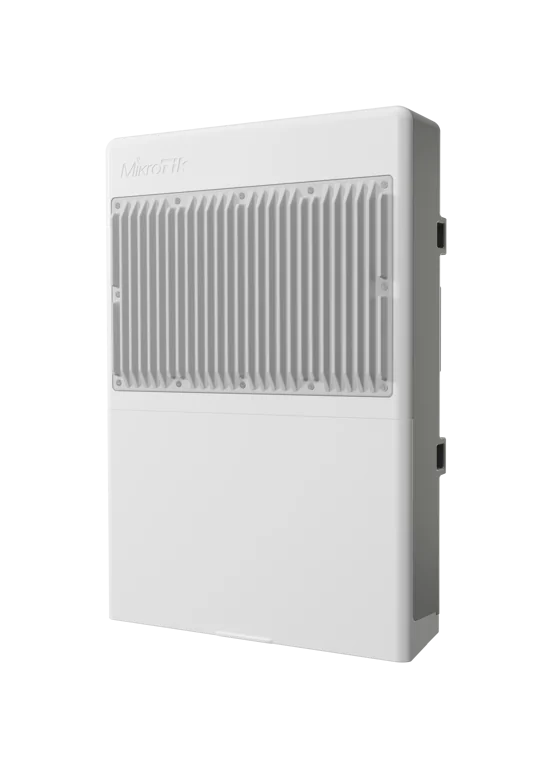
Flagship outdoor PoE da MikroTik. 16 portas GIGABIT PoE-OUT 802.3af/at, DUAL DC input com redundancia, 2x SFP+ 10G para uplink de fibra, dual boot RouterOS v7 / SwOS e gabinete IP54 para instalacao externa em torres, postes e ambientes expostos.
O Que Vem na Caixa
- 1x netPower 16P (CRS318-16P-2S+OUT)
- 1x Kit de montagem (hose clamps / bracadeiras para poste)
- 1x Conjunto de gromets e vedacoes IP54
- 1x Manual rapido de instalacao
Fonte de alimentacao nao inclusa. O netPower 16P e alimentado via 2x DC jacks (18-30V OU 48-57V). Para carga total PoE (ate 316W) e necessario dimensionar fontes externas adequadas e, opcionalmente, usar as duas entradas DC para redundancia.
Especificacoes Tecnicas
| Especificacao | netPower 16P (CRS318-16P-2S+OUT) |
|---|---|
| Switch Chip | Marvell Prestera 98DX226S |
| CPU | 98DX226S dual-core @ 800 MHz |
| Memoria RAM | 256 MB |
| Armazenamento | 16 MB FLASH |
| Sistema Operacional | RouterOS v7 / SwOS (Dual Boot) |
| Portas Ethernet | 16x 10/100/1000 Mbps Gigabit PoE-OUT |
| SFP+ | 2x SFP+ (1G / 10G) |
| PoE-OUT | 802.3af/at (Type 1 / Type 2) em todas as 16 portas |
| Entradas DC | 2x DC jacks (dual input redundante) |
| Faixa de Tensao DC | 18-30V OU 48-57V |
| Corrente PoE por Entrada | 2.8A @ 18-30V / 1.4A @ 48-57V |
| Consumo Idle | 16W (sem carga PoE) |
| Consumo Maximo | 316W (carga total PoE + acessorios) |
| Refrigeracao | Passivo (fanless, sem ventiladores) |
| Dimensoes | 303 x 212 x 78 mm |
| Protecao | IP54 (outdoor-ready) |
| Temperatura de Operacao | -40 C a +70 C |
| Montagem | Hose clamp (bracadeira em poste/torre) |
| Capacidade Total | 36 Gbps non-blocking / 72 Gbps switching / 53.6 Mpps |
| Certificacoes | CE, EAC, RoHS, FCC |
| Acesso Padrao | IP: 192.168.88.1, usuario: admin, sem senha |
| Preco MikroTik (USD) | $279 |
Flagship outdoor PoE da MikroTik. Diferente do netPower 15FR (Fast Ethernet), o netPower 16P oferece 16 portas GIGABIT com PoE-OUT 802.3af/at, dois uplinks SFP+ 10G e dupla entrada DC. Gabinete IP54 permite instalacao em topo de torre, postes, fachadas e ambientes industriais sem necessidade de caixa hermetica adicional.
Voltagens e PoE
| Tipo de Entrada / Saida | netPower 16P |
|---|---|
| DC Jack 1 | 18-30V OU 48-57V |
| DC Jack 2 (redundancia) | 18-30V OU 48-57V |
| Corrente por Entrada @ 18-30V | 2.8A |
| Corrente por Entrada @ 48-57V | 1.4A |
| PoE-OUT (padrao) | 802.3af / 802.3at (em todas as 16 portas) |
| Consumo Idle | 16W |
| Consumo Maximo com PoE | 316W |
DUAL DC INPUT com redundancia. As duas entradas DC sao independentes - se uma fonte falhar, o switch continua operando pela segunda. Ideal para aplicacoes criticas em torres de telecom, CFTV municipal e smart city onde a disponibilidade e essencial. Use fontes 48-57V para alimentar PoE-OUT 802.3af/at padrao em distancias longas.
Diagrama de Bloco
Benchmarks Oficiais
Dados oficiais de desempenho do switch chip Marvell Prestera 98DX226S e portas do netPower 16P. Capacidade total: 36 Gbps non-blocking / 72 Gbps switching / 53.6 Mpps forwarding rate. Fonte: mikrotik.com/product/netpower_16p
Non-blocking Layer 2 Throughput
| Tamanho do Pacote | kpps | Mbps |
|---|---|---|
| 1518 Bytes | 2.925,8 | 35.528,8 |
| 512 Bytes | 8.458,3 | 34.645,2 |
| 64 Bytes | 26.800,0 | 13.721,6 |
Throughput unidirecional Layer 2 non-blocking (16x GbE + 2x SFP+ 10G). Fonte: mikrotik.com
Throughput Visual (Layer 2 - 1518B)
Escala: 0 - 36.000 Mbps | Pacotes 1518 Bytes
L2 Throughput 1518B
35.529 Mbps
L2 Throughput 512B
34.645 Mbps
L2 Throughput 64B
13.722 Mbps
L1 Throughput (wire-speed 1518B)
36.000 Mbps
36 Gbps non-blocking, 53.6 Mpps de forwarding rate. O Marvell Prestera 98DX226S entrega wire-speed em pacotes grandes (512B e 1518B) com capacidade total bidirecional de 72 Gbps. Perfeito para agregar 16 cameras IP + APs + sensores com uplink redundante 10G para fibra do backbone.
Sugestao de Aplicacao
Hub de CFTV Outdoor
Concentrador de ate 16 cameras IP 802.3af/at instalado diretamente em torre ou poste, com uplink 10G em fibra otica ao DVR/NVR central. Gabinete IP54 dispensa rack interno e reduz custo de infraestrutura.
Agregador de APs Outdoor
Alimenta ate 16 pontos de acesso Wi-Fi outdoor via PoE 802.3af/at para cobertura mesh/hotspot publico em pracas, estadios, portos, parques industriais e campus universitarios com uplink 10G.
Smart City / IoT Municipal
Infraestrutura de cidade inteligente com sensores IoT PoE (iluminacao publica, qualidade do ar, contadores, leitores LPR). Temperatura de -40 a +70 C e IP54 garantem operacao continua em clima brasileiro.
Torre de Telecom Multi-Servico
Single switch no topo de torre concentrando APs, cameras, radios ponto-a-ponto e sensores - tudo com PoE-OUT e uplink 10G em fibra. Dual DC input garante redundancia com duas fontes independentes.
Configuracao e Integracao
1. Configuracao Basica (RouterOS v7)
# Acesso inicial ao netPower 16P (modo RouterOS v7)
# 1. Conecte um cabo Ethernet em qualquer porta (1-16)
# 2. Configure seu PC com IP na faixa 192.168.88.x
# 3. Acesse via Winbox, WebFig ou SSH:
#
#    Endereco: 192.168.88.1
#    Usuario:  admin
#    Senha:    (em branco, sem senha)
#
# Definir identidade e senha:
/system identity set name=netPower-16P-Torre01
/user set admin password="SenhaForte123!"

# Configurar NTP e timezone
/system clock set time-zone-name=America/Fortaleza
/system ntp client set enabled=yes servers=a.ntp.br,b.ntp.br
2. Bridge com VLAN Filtering + Hardware Offload
# Bridge unica com vlan-filtering e HW offload no chip Marvell 98DX226S
/interface bridge
add name=bridge-main vlan-filtering=no protocol-mode=rstp

# Adicionar todas as portas ao bridge (habilita HW offload)
/interface bridge port
add bridge=bridge-main interface=ether1 hw=yes
add bridge=bridge-main interface=ether2 hw=yes
add bridge=bridge-main interface=ether3 hw=yes
add bridge=bridge-main interface=ether4 hw=yes
add bridge=bridge-main interface=ether5 hw=yes
add bridge=bridge-main interface=ether6 hw=yes
add bridge=bridge-main interface=ether7 hw=yes
add bridge=bridge-main interface=ether8 hw=yes
add bridge=bridge-main interface=ether9 hw=yes
add bridge=bridge-main interface=ether10 hw=yes
add bridge=bridge-main interface=ether11 hw=yes
add bridge=bridge-main interface=ether12 hw=yes
add bridge=bridge-main interface=ether13 hw=yes
add bridge=bridge-main interface=ether14 hw=yes
add bridge=bridge-main interface=ether15 hw=yes
add bridge=bridge-main interface=ether16 hw=yes
add bridge=bridge-main interface=sfp-sfpplus1 hw=yes
add bridge=bridge-main interface=sfp-sfpplus2 hw=yes
3. VLANs por Tipo de Dispositivo
# Segmentacao logica: cameras, APs, IoT, gerencia
# Portas 1-8:   cameras IP (VLAN 100)
# Portas 9-12:  access points outdoor (VLAN 200)
# Portas 13-16: sensores IoT / leitores LPR (VLAN 300)
# SFP+ 1:       uplink trunk (core/fibra)
# SFP+ 2:       uplink trunk redundante (LACP)
# Gerencia:     VLAN 10 (tagged no trunk)

/interface bridge port
set [find interface=ether1]  pvid=100
set [find interface=ether2]  pvid=100
set [find interface=ether3]  pvid=100
set [find interface=ether4]  pvid=100
set [find interface=ether5]  pvid=100
set [find interface=ether6]  pvid=100
set [find interface=ether7]  pvid=100
set [find interface=ether8]  pvid=100
set [find interface=ether9]  pvid=200
set [find interface=ether10] pvid=200
set [find interface=ether11] pvid=200
set [find interface=ether12] pvid=200
set [find interface=ether13] pvid=300
set [find interface=ether14] pvid=300
set [find interface=ether15] pvid=300
set [find interface=ether16] pvid=300

/interface bridge vlan
add bridge=bridge-main vlan-ids=10  tagged=bridge-main,sfp-sfpplus1,sfp-sfpplus2
add bridge=bridge-main vlan-ids=100 tagged=sfp-sfpplus1,sfp-sfpplus2 untagged=ether1,ether2,ether3,ether4,ether5,ether6,ether7,ether8
add bridge=bridge-main vlan-ids=200 tagged=sfp-sfpplus1,sfp-sfpplus2 untagged=ether9,ether10,ether11,ether12
add bridge=bridge-main vlan-ids=300 tagged=sfp-sfpplus1,sfp-sfpplus2 untagged=ether13,ether14,ether15,ether16

# Ativar vlan-filtering (aplica a tabela acima)
/interface bridge set bridge-main vlan-filtering=yes
4. IP, Gateway e DNS (VLAN de gerencia)
# Interface VLAN 10 (gerencia) sobre o bridge
/interface vlan
add interface=bridge-main name=vlan10-mgmt vlan-id=10

# IP estatico de gerencia
/ip address
add address=10.10.10.16/24 interface=vlan10-mgmt comment="Mgmt netPower 16P"

# Gateway e DNS
/ip route
add dst-address=0.0.0.0/0 gateway=10.10.10.1 comment="Default route"

/ip dns set servers=1.1.1.1,8.8.8.8 allow-remote-requests=no
5. Firewall Input (proteger gerencia do switch)
# Firewall: bloquear acesso a gerencia fora da VLAN 10
/ip firewall filter
add chain=input connection-state=established,related action=accept comment="Estabelecidas"
add chain=input connection-state=invalid action=drop comment="Invalidas"
add chain=input in-interface=vlan10-mgmt action=accept comment="Aceita gerencia"
add chain=input protocol=icmp limit=10,5:packet action=accept comment="Ping limitado"
add chain=input action=drop comment="Dropar qualquer outro input"
6. Hardware Offloading no Switch Chip
# Conferir HW offload ativo em todas as portas
/interface bridge port print where hw=yes

# Status do chip Marvell 98DX226S
/interface ethernet switch print
/interface ethernet switch port print

# Monitorar utilizacao por porta (sem saturar CPU)
/interface ethernet monitor [find name=ether1] once
/interface ethernet monitor [find name=sfp-sfpplus1] once

# Dica: quando vlan-filtering=yes + hw=yes, todo o roteamento
# entre portas e feito pelo chip Marvell, liberando a CPU dual-core
# 800 MHz para gerencia, SNMP, monitoramento e scripts.
7. Gerenciamento de PoE-OUT 802.3af/at
# Habilitar/desabilitar PoE-OUT em cada porta
/interface ethernet poe
set [find interface=ether1]  poe-out=auto-on
set [find interface=ether2]  poe-out=auto-on
set [find interface=ether3]  poe-out=auto-on
set [find interface=ether4]  poe-out=auto-on
set [find interface=ether5]  poe-out=auto-on
set [find interface=ether6]  poe-out=auto-on
set [find interface=ether7]  poe-out=auto-on
set [find interface=ether8]  poe-out=auto-on
set [find interface=ether9]  poe-out=auto-on
set [find interface=ether10] poe-out=auto-on
set [find interface=ether11] poe-out=auto-on
set [find interface=ether12] poe-out=auto-on
set [find interface=ether13] poe-out=auto-on
set [find interface=ether14] poe-out=auto-on
set [find interface=ether15] poe-out=auto-on
set [find interface=ether16] poe-out=auto-on

# Prioridade PoE (1=maior, 99=menor)
# Em caso de pico de carga, portas com maior prioridade permanecem ativas
/interface ethernet poe
set [find interface=ether1]  poe-priority=10 comment="Camera entrada principal"
set [find interface=ether9]  poe-priority=20 comment="AP externo publico"
set [find interface=ether13] poe-priority=50 comment="Sensor IoT - menor prioridade"

# Forcar desligar PoE em uma porta especifica
/interface ethernet poe set [find interface=ether16] poe-out=off

# Monitorar consumo PoE em tempo real
/interface ethernet poe monitor ether1,ether9,ether13 once
8. LACP Bonding em SFP+ 10G (uplink redundante)
# Agregar os 2x SFP+ 10G em um unico link LACP (802.3ad)
# Resultado: uplink ate 20 Gbps agregado com failover automatico

# 1. Remover SFP+ individualmente do bridge antes de criar o bond
/interface bridge port remove [find interface=sfp-sfpplus1]
/interface bridge port remove [find interface=sfp-sfpplus2]

# 2. Criar bonding LACP
/interface bonding
add name=bond-uplink slaves=sfp-sfpplus1,sfp-sfpplus2 mode=802.3ad \
    transmit-hash-policy=layer-2-and-3 lacp-rate=1sec

# 3. Adicionar o bond ao bridge como trunk
/interface bridge port add bridge=bridge-main interface=bond-uplink hw=yes

# 4. Atualizar tabela de VLAN para usar o bond como tagged
/interface bridge vlan
set [find vlan-ids=10]  tagged=bridge-main,bond-uplink
set [find vlan-ids=100] tagged=bond-uplink
set [find vlan-ids=200] tagged=bond-uplink
set [find vlan-ids=300] tagged=bond-uplink

# Do lado do core (router/switch superior), configurar LACP espelhado.
9. Seguranca: Storm Control, RSTP e BPDU Guard
# RSTP ja habilitado no bridge (protocol-mode=rstp)
# BPDU Guard em portas de borda (cameras, APs, IoT) evita loops

/interface bridge port
set [find interface=ether1]  edge=yes bpdu-guard=yes
set [find interface=ether2]  edge=yes bpdu-guard=yes
set [find interface=ether3]  edge=yes bpdu-guard=yes
set [find interface=ether4]  edge=yes bpdu-guard=yes
set [find interface=ether5]  edge=yes bpdu-guard=yes
set [find interface=ether6]  edge=yes bpdu-guard=yes
set [find interface=ether7]  edge=yes bpdu-guard=yes
set [find interface=ether8]  edge=yes bpdu-guard=yes
set [find interface=ether9]  edge=yes bpdu-guard=yes
set [find interface=ether10] edge=yes bpdu-guard=yes
set [find interface=ether11] edge=yes bpdu-guard=yes
set [find interface=ether12] edge=yes bpdu-guard=yes
set [find interface=ether13] edge=yes bpdu-guard=yes
set [find interface=ether14] edge=yes bpdu-guard=yes
set [find interface=ether15] edge=yes bpdu-guard=yes
set [find interface=ether16] edge=yes bpdu-guard=yes

# Storm Control no switch chip (limita broadcast/multicast/unknown)
/interface ethernet switch port
set [find name=ether1] broadcast-flood-limit=1000 \
    multicast-flood-limit=1000 unknown-unicast-flood-limit=1000

# Aplicar storm-control em todas as portas de borda (loop)
:foreach i in=[find] do={
  /interface ethernet switch port set $i \
    broadcast-flood-limit=1000 multicast-flood-limit=1000
}
10. Alternar entre RouterOS e SwOS (Dual Boot)
# O netPower 16P suporta DUAL BOOT entre RouterOS v7 e SwOS
# Use SwOS quando quiser apenas um switch simples gerenciado via web
# Use RouterOS quando precisar de roteamento, VLANs avancadas, firewall, etc.

# --- De dentro do RouterOS ---
# Ver sistema atual
/system routerboard print

# Alternar para SwOS no proximo boot
/system routerboard settings set boot-os=swos

# Reiniciar para aplicar
/system reboot

# --- De dentro do SwOS ---
# 1. Acesse http://192.168.88.1
# 2. Na aba "System", localize o campo "Boot OS"
# 3. Selecione "router-os" e clique em "Apply" -> "Reboot"
#
# Apos o reboot o equipamento iniciara no RouterOS v7 novamente.
# Importante: as configuracoes de cada OS sao independentes
# (alternar NAO exporta/importa config automaticamente).
RouterOS v7 ou SwOS? Use SwOS para cenarios simples de comutacao (CFTV puro, uplink unico). Use RouterOS v7 quando precisar de VLANs avancadas, LACP, BPDU guard, firewall, SNMP, scripts e integracao com CAPsMAN / RADIUS. Ambos rodam com HW offload no chip Marvell 98DX226S, entregando 36 Gbps non-blocking.