
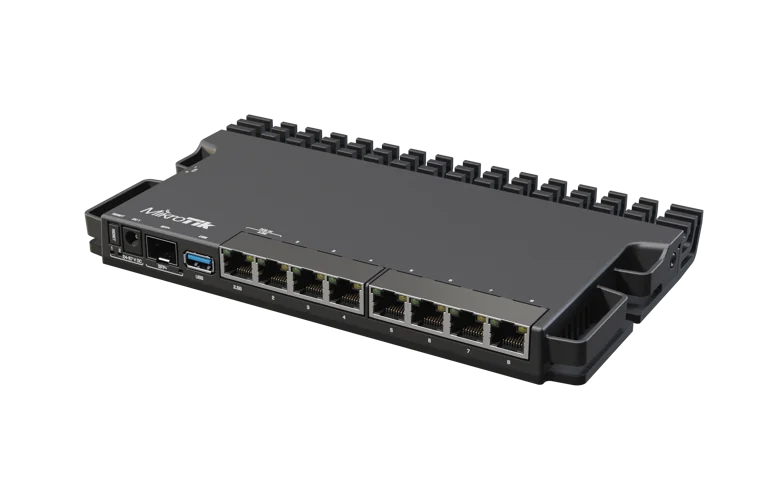
Melhor custo-beneficio geral. O RB5009UG+S+IN oferece a combinacao ideal de porta 2.5G, SFP+ 10G e construcao fanless para novos deployments com visao de futuro. Pronto para WiFi 6/6E e uplinks modernos.
O Que Vem na Caixa
- 1x RouterBOARD 5009UG+S+IN
- 1x Adaptador de energia 24V 1.2A
- 1x Conjunto de pes de borracha (desktop)
- 1x Guia rapido
Especificacoes Tecnicas
| Especificacao | RB5009UG+S+IN |
|---|---|
| CPU | Marvell Armada 88F7040, ARM 64-bit, 4 cores, 1.4 GHz |
| RAM | 1 GB DDR4 |
| Storage | 1 GB NAND |
| Portas Ethernet | 7x Gigabit (10/100/1000) + 1x 2.5 Gigabit = 8 total |
| SFP+ | 1x SFP+ (10G) |
| USB | 1x USB 3.0 Type A (1.5A max) |
| PoE-IN | 802.3af/at na porta 1 (24-57V) |
| PoE-OUT | Nenhum (modelo padrao); RB5009UPr+S+IN tem PoE em todas as portas |
| Alimentacao | 3 opcoes: PoE porta 1 + DC jack (24-57V) + conector 2 pinos |
| Consumo maximo | 25W (14W sem perifericos) - menor consumo da linha |
| Form Factor | Desktop compacto, 220 x 125 x 22 mm, fanless; 4 unidades em 1U |
| Temperatura | -40 C a +60 C (faixa mais ampla da linha) |
| RouterOS | Licenca Level 5 (somente v7) |
| Switch Chip | Marvell Amethyst 88E6393 com link 10 Gbps full-duplex ao CPU |
| Recursos Especiais | Porta 2.5G, DDR4, 3 entradas de energia, ultra-compacto |
Voltagens e Alimentacao
| Entrada | Tensao | Observacao |
|---|---|---|
| DC Jack | 24-57V | Conector barrel padrao |
| Conector 2 pinos | 24-57V | Para instalacoes customizadas e rack |
| PoE-IN (Porta 1) | 24-57V | 802.3af/at - ideal para ambientes remotos |
| PoE-OUT | N/A | Nenhum no modelo padrao |
Redundancia tripla. O RB5009 aceita 3 fontes de alimentacao simultaneas. Se uma falhar, as demais assumem automaticamente, garantindo alta disponibilidade sem hardware adicional.
Diagrama de Bloco
Benchmarks
Escala: 0 - 10.000 Mbps | Fonte: MikroTik (testes em laboratorio)
Bridging 1518B
9.851 Mbps
Bridging 64B
3.138 Mbps / 5.768 kpps
Routing Fast Path 1518B
~9.800 Mbps
IPsec AES-128 1400B
~1.100 Mbps
Quase wire-speed em bridging. Com pacotes de 1518 bytes, o RB5009 atinge 9.851 Mbps - praticamente o limite teorico de 10 Gbps. O switch chip Amethyst com link dedicado de 10 Gbps ao CPU garante esse desempenho.
Sugestao de Aplicacao
Home Lab / Prosumer
Compacto e silencioso (fanless), com porta 2.5G ideal para APs WiFi 6. Perfeito para quem quer desempenho profissional sem ruido e sem ventilacao forcada.
WISP / Micro-POP
Opera de -40 C a +60 C, aceita PoE-IN e cabe 4 unidades em 1U de rack. Ideal para pontos de presenca compactos em ambientes extremos.
Agregacao 2.5G/10G
A porta 2.5G nativa (ether8) combinada com SFP+ 10G permite conectar APs WiFi 6 e uplinks de alta velocidade em um unico equipamento.
Firewall Compacto
CPU ARM 64-bit otimizado para RouterOS v7 com fast path. Consumo de apenas 14W sem perifericos, ideal para funcoes de firewall e NAT em borda.
Scripts de Configuracao RouterOS v7
Copie e cole diretamente no terminal do RouterOS. Todos os scripts foram validados para RouterOS v7.x.
Configuracao Basica
/system identity set name="RB5009-BORDA"
/system clock set time-zone-name=America/Sao_Paulo
/system ntp client set enabled=yes
/system ntp client servers add address=a.ntp.br
/system ntp client servers add address=b.ntp.br
/system routerboard settings set cpu-frequency=auto
DNS
/ip dns set servers=8.8.8.8,8.8.4.4,1.1.1.1 allow-remote-requests=yes cache-size=8192KiB cache-max-ttl=1d
Rota Default
/ip route add dst-address=0.0.0.0/0 gateway=<GATEWAY-ISP> distance=1 comment="Rota Default"
Servidor PPPoE
/ip pool add name=pool-pppoe ranges=10.10.0.2-10.10.3.254

/ppp profile add name=perfil-pppoe local-address=10.10.0.1 \
    remote-address=pool-pppoe dns-server=8.8.8.8,8.8.4.4 \
    change-tcp-mss=yes use-mpls=default \
    use-compression=default use-encryption=default

/interface pppoe-server server add service-name=MevloxPPPoE \
    interface=ether2 default-profile=perfil-pppoe \
    authentication=chap,mschap2 max-mtu=1480 max-mru=1480 \
    keepalive-timeout=30 disabled=no

/ppp secret add name=cliente001 password=SenhaSegura123! \
    profile=perfil-pppoe service=pppoe
Firewall Padrao
# Interface Lists
/interface list add name=WAN
/interface list add name=LAN
/interface list member add interface=ether1 list=WAN
/interface list member add interface=ether2 list=LAN
/interface list member add interface=ether3 list=LAN
/interface list member add interface=ether4 list=LAN
/interface list member add interface=ether5 list=LAN
/interface list member add interface=ether6 list=LAN
/interface list member add interface=ether7 list=LAN
/interface list member add interface=ether8 list=LAN

# Filter
/ip firewall filter
add chain=input connection-state=established,related action=accept \
    comment="Aceita estabelecidas"
add chain=input connection-state=invalid action=drop \
    comment="Descarta invalidas"
add chain=input protocol=icmp limit=10,5:packet action=accept \
    comment="ICMP limitado"
add chain=input protocol=icmp action=drop \
    comment="Excesso ICMP"
add chain=input in-interface-list=LAN action=accept \
    comment="Aceita LAN"
add chain=input action=drop \
    comment="Descarta resto"

add chain=forward connection-state=established,related \
    action=fasttrack-connection comment="FastTrack"
add chain=forward connection-state=established,related action=accept
add chain=forward connection-state=invalid action=drop \
    comment="Descarta invalidas"
add chain=forward connection-state=new in-interface-list=WAN action=drop \
    comment="Bloqueia new WAN"
add chain=forward action=accept

# NAT
/ip firewall nat
add chain=srcnat out-interface-list=WAN action=masquerade \
    comment="NAT Masquerade"
Seguranca
/ip service
set telnet disabled=yes
set ftp disabled=yes
set www disabled=no port=8080
set ssh port=2222
set api disabled=yes
set api-ssl disabled=yes
set winbox disabled=no

/tool mac-server set allowed-interface-list=LAN
/tool mac-server mac-winbox set allowed-interface-list=LAN
/tool bandwidth-server set enabled=no
/ip proxy set enabled=no
/ip socks set enabled=no
/ip upnp set enabled=no
/ip cloud set ddns-enabled=no update-time=no

# SSH Brute Force Protection
/ip firewall filter
add chain=input protocol=tcp dst-port=2222 \
    src-address-list=ssh-blocked action=drop
add chain=input protocol=tcp dst-port=2222 \
    connection-state=new action=add-src-to-address-list \
    address-list=ssh-stage1 address-list-timeout=1m
add chain=input protocol=tcp dst-port=2222 \
    connection-state=new src-address-list=ssh-stage1 \
    action=add-src-to-address-list \
    address-list=ssh-stage2 address-list-timeout=1m
add chain=input protocol=tcp dst-port=2222 \
    connection-state=new src-address-list=ssh-stage2 \
    action=add-src-to-address-list \
    address-list=ssh-blocked address-list-timeout=1d

# Backup automatico
/system scheduler add name=backup-diario interval=1d \
    on-event="/system backup save name=backup-auto dont-encrypt=yes" \
    start-time=03:00:00

# Atualizar RouterOS
/system package update set channel=long-term
Configuracao da Porta 2.5G
# Ether8 e a porta 2.5G - ideal para uplink de AP WiFi 6/6E
/interface ethernet set ether8 speed=2.5Gbps \
    comment="Uplink AP WiFi 6 - 2.5G"

# Bridge para LAN com ether8
/interface bridge add name=bridge-lan
/interface bridge port add interface=ether2 bridge=bridge-lan
/interface bridge port add interface=ether3 bridge=bridge-lan
/interface bridge port add interface=ether8 bridge=bridge-lan \
    comment="2.5G AP"

/ip address add address=192.168.88.1/24 interface=bridge-lan
VLANs para Segmentacao
# VLAN Trunk na SFP+
/interface vlan add name=vlan-gerencia vlan-id=10 \
    interface=sfp-sfpplus1 comment="Gerencia"
/interface vlan add name=vlan-clientes vlan-id=20 \
    interface=sfp-sfpplus1 comment="Clientes"
/interface vlan add name=vlan-voip vlan-id=30 \
    interface=sfp-sfpplus1 comment="VoIP"

# IPs por VLAN
/ip address add address=10.10.10.1/24 interface=vlan-gerencia
/ip address add address=10.10.20.1/24 interface=vlan-clientes
/ip address add address=10.10.30.1/24 interface=vlan-voip

# DHCP por VLAN
/ip pool add name=pool-gerencia ranges=10.10.10.10-10.10.10.254
/ip pool add name=pool-voip ranges=10.10.30.10-10.10.30.254

/ip dhcp-server add name=dhcp-gerencia interface=vlan-gerencia \
    address-pool=pool-gerencia
/ip dhcp-server network add address=10.10.10.0/24 \
    gateway=10.10.10.1 dns-server=8.8.8.8
/ip dhcp-server add name=dhcp-voip interface=vlan-voip \
    address-pool=pool-voip
/ip dhcp-server network add address=10.10.30.0/24 \
    gateway=10.10.30.1 dns-server=8.8.8.8